


Skip to content
SquadOS
Theme
Log in

Chat in rooms with your team and AI

Talk by topic with people and agents, write @Agent to delegate a task in the thread and run link meetings with transcription and minutes posted to the room.

  • @Agent in the thread
  • Meetings with minutes
  • Business plan
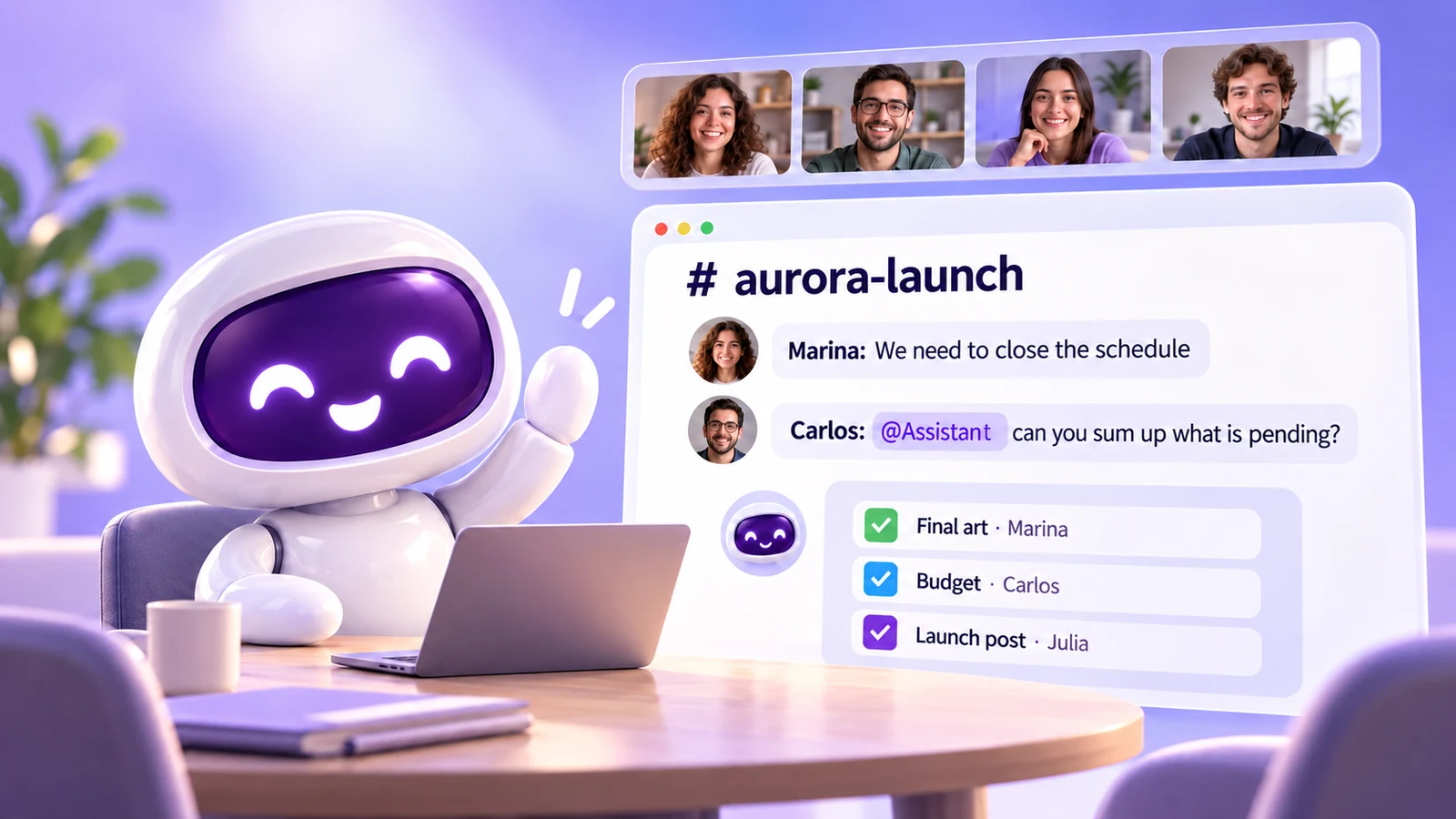
SquadOS mascot waving at a desk next to the # aurora-launch room, with four people on video above it: Carlos asks @Assistant to sum up what is pending and the agent lists final art, budget and launch post by owner, all checked off.

What are SquadOS work rooms?

Three teammates and the SquadOS mascot around a table, with the room board floating above them, full of chat bubbles and a checklist.

A room brings together people, departments and AI agents in a topic-based conversation, with threads, mentions, reactions and attachments. Each room can hold up to 8,000 characters of context to guide the agents.

When someone writes @Agent, the agent works in that message’s thread and shows progress on a card: queued, working, waiting for you or done, with the credits used. Link meetings produce minutes in the room.

@Agent in the thread
One agent per message, reading only the message and its thread.
Link meetings
Up to 30 participants, or 100 in Stage mode.
Minutes in the room
Summary, Decisions, Action items and Open questions.
Direct messages
Private conversations between two people in your organization.

How to work in rooms in SquadOS

From conversation to finished task, with your team and agents. Highlighted names are the buttons and screens of the product.

  1. Step 1: Create the room

    In the Hub, next to Rooms, use New room and choose People, Departments and AI agents as participants.

  2. Step 2: Call an agent

    Type @ or use Summon an agent. The card shows progress and credits used, and the agent replies in the thread.

  3. Step 3: Hold the meeting

    In Meetings, create an instant, scheduled or recurring link and check Allow transcription and minutes.

  4. Step 4: Get the minutes in the room

    When it ends, the minutes with Summary, Decisions, Action items and Open questions arrive in the room. Use Copy or Download Markdown.

How to get work rooms

Rooms, direct messages and meetings are part of the Business plan, with no user limit. Calling agents, transcription and minutes use credits.

Availability by plan

  • Free

    Not included

    Free is for one person. Rooms and meetings are on Business.

  • Individual Plus

    Not included

    Individual Plus is for one person. Rooms and meetings are on Business.

  • Business

    Included

    Rooms, direct messages and meetings for the team, with 15,000 monthly credits.

Where to use it

  • Web : Available. Rooms and Meetings in the Hub.
  • Mobile : Available. Rooms and direct messages in the iPhone and Android app.
  • Studio Not available Rooms live on the Web and in the app.

Start in 3 steps

  1. Create your account
  2. Choose your plan
  3. Open the Hub

The Free plan comes with 100 monthly credits to try SquadOS. Invite your team, create the first room and call an agent with @.

Compare SquadOS plans

Business costs R$99.40 a month for the first 12 months, with no user limit. On the receipt, AI, meetings, chat, CRM and email for 5 people add up to R$2,010.49 a month.

8 separate subscriptions R$2,010.49

Separate subscriptions

Monthly prices as of Oct 24, 2026

Monthly total R$2,010.49

Exchange rate: R$5 per US$1 · ≈ estimate

Individual Plus

For one person. Does not include rooms, meetings or service automations.

was R$14230% off for 12 months

R$99.40 /month

30% off for 12 months, then R$142/month. Billed in Brazilian reais.

Subscribe to Individual Plus

SQUADOS30OFF coupon already applied at checkout

10,000 credits a month

  • Unlimited personal chat on selected models, marked with ∞
  • AI image, video and file creation
  • One account for your individual use
Explore SquadOS for you

Prefer to start small? Start with the Free plan and 100 credits a month

Third-party monthly prices checked on Oct 24, 2026 on the official sites (linked on the receipt), excluding taxes and promotions. R$5 per US$1 is an assumption, not a live rate. Zoom and Slack include 5 seats. CRM (R$500) and ActiveCampaign (R$520) are estimated budgets, marked with ≈; ActiveCampaign pricing depends on plan and contact count. This compares budgets: each product has its own capabilities and terms.

Money-back guarantee · 7 days · Money-back guarantee · 7 days · 7 days

Subscribe with a 7-day guarantee

Use SquadOS for up to 7 days after subscribing. If it is not right for you, request cancellation and a refund through the contact page.

  1. Subscribe
  2. Use it for up to 7 days
  3. Request a refund
Go to the contact page