
Skip to content
SquadOS
Theme
Log in

Organize conversations and contacts in the CRM

See WhatsApp, Instagram, email and site chat in one inbox, with contacts, tags, internal notes and lists. AI replies and your team steps in when needed, without losing the history.

  • No per-contact fee
  • CSV import
  • Human replies use no credits
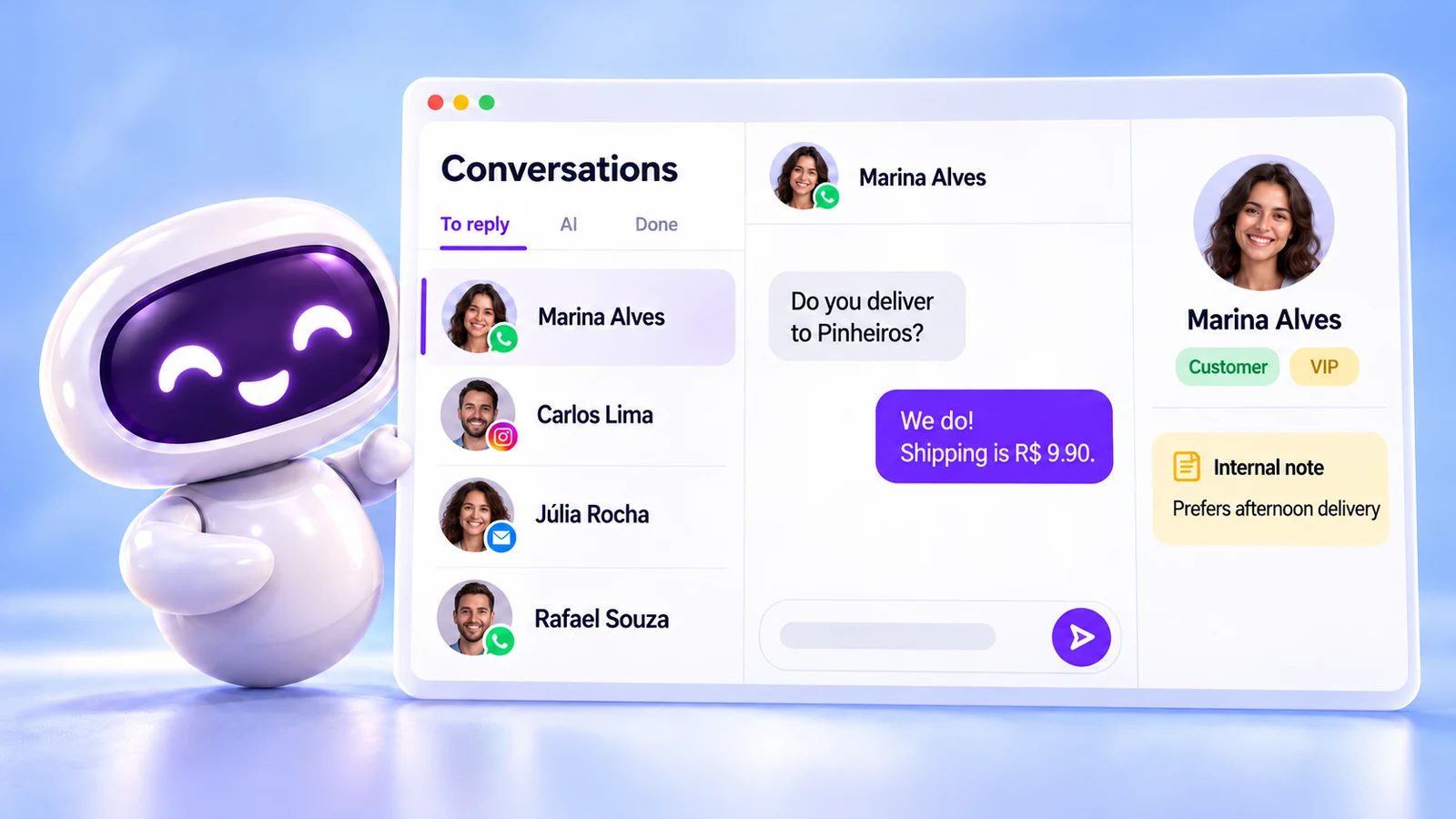
SquadOS mascot next to the Conversations screen, with the To reply, AI and Completed tabs, WhatsApp, Instagram and email badges, the question "Do you deliver to Pinheiros?" answered with "We do! Shipping is R$ 9.90." and the contact card tagged Customer and VIP with the internal note "Prefers afternoon delivery".

What is the SquadOS CRM?

SquadOS mascot sorting colorful contact cards into trays on a bright desk.

It is where the conversations from every inbox live, along with the contacts of everyone who talked to you. Each conversation shows who owns it, whose turn it is to reply and what state it is in.

Views such as To reply, Unassigned and AI organize the queue. Tags, internal notes and lists keep the context, and lists feed campaigns and automations.

One inbox
WhatsApp, Instagram, email, Telegram, widget and API in one place.
Contacts
Data sources, tags, notes and CSV import.
Bulk actions
Assign, transfer, snooze, complete and tag many conversations at once.
AI and team
A person claims the chat and hands it back to the agent in the same thread.

How to organize conversations in the SquadOS CRM

From the queue to each customer’s context. Highlighted names are the buttons and screens of the product.

  1. Step 1: Filter the conversation queue

    The To reply, Mine, Unassigned and AI views show what needs action now. Filter by channel, inbox, agent or tag.

  2. Step 2: Claim it or hand it back

    Use Claim to reply yourself. When you are done, transfer it back to the agent from Conversation actions.

  3. Step 3: Record the context

    Apply conversation and contact tags and write an Internal note that only your team can see.

  4. Step 4: Build lists

    In Contacts, use Import CSV or filter by tag and organize Lists for campaigns and automations.

How to get the CRM and conversations

Inboxes, conversations and contacts are part of every plan. Business adds the team: several people working the same inbox.

Availability by plan

  • Free

    Included

    One person and 100 monthly credits for AI replies.

  • Individual Plus

    Included

    One person and 10,000 monthly credits for AI replies.

  • Business

    Included

    A team with no user limit, no per-contact fee and 15,000 monthly credits.

Where to use it

  • Web : Available. Conversations and Contacts in the dashboard.
  • Studio Not available The CRM lives on the Web.

Start in 3 steps

  1. Create your account
  2. Choose your plan
  3. Connect your first inbox

The Free plan comes with 100 monthly credits to try SquadOS. In the dashboard, open Inboxes and select Connect inbox.

Replying manually uses no credits. Credits are used by AI replies.

Compare SquadOS plans

Business costs R$99.40 a month for the first 12 months, with no user limit. On the receipt, AI, meetings, chat, CRM and email for 5 people add up to R$2,010.49 a month.

8 separate subscriptions R$2,010.49

Separate subscriptions

Monthly prices as of Oct 24, 2026

Monthly total R$2,010.49

Exchange rate: R$5 per US$1 · ≈ estimate

Individual Plus

For one person. Does not include rooms, meetings or service automations.

was R$14230% off for 12 months

R$99.40 /month

30% off for 12 months, then R$142/month. Billed in Brazilian reais.

Subscribe to Individual Plus

SQUADOS30OFF coupon already applied at checkout

10,000 credits a month

  • Unlimited personal chat on selected models, marked with ∞
  • AI image, video and file creation
  • One account for your individual use
Explore SquadOS for you

Prefer to start small? Start with the Free plan and 100 credits a month

Third-party monthly prices checked on Oct 24, 2026 on the official sites (linked on the receipt), excluding taxes and promotions. R$5 per US$1 is an assumption, not a live rate. Zoom and Slack include 5 seats. CRM (R$500) and ActiveCampaign (R$520) are estimated budgets, marked with ≈; ActiveCampaign pricing depends on plan and contact count. This compares budgets: each product has its own capabilities and terms.

Money-back guarantee · 7 days · Money-back guarantee · 7 days · 7 days

Subscribe with a 7-day guarantee

Use SquadOS for up to 7 days after subscribing. If it is not right for you, request cancellation and a refund through the contact page.

  1. Subscribe
  2. Use it for up to 7 days
  3. Request a refund
Go to the contact page